
概述
本章,您将学习到 Nginx 的目录浏览(目录列表)功能。
如果您经常下载开源项目的源码压缩包,可能经常遇到这样的页面,比如这样的:
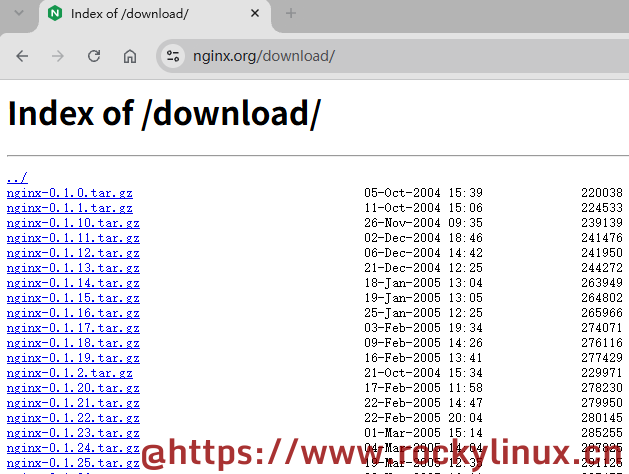
几乎所有的开源 Web 软件都支持目录浏览(目录列表)功能。
目录浏览(目录列表):允许用户在访问 Web 服务器的某个目录时,如果该目录下没有默认的索引文件(如 index.html),Nginx 会自动生成并返回一个包含该目录下所有文件和子目录列表的 HTML 页面。出于安全性考虑,Nginx 默认情况下关闭了该功能。
相关指令
autoindex指令 - 当不存在索引文件时,是否启用目录浏览功能,语法为autoindex on | off;,默认为autoindex off;autoindex_exact_size指令 - 对于 HTML 页面,是否精准显示文件大小,语法为autoindex_exact_size on | off;,默认为autoindex_exact_size on;。当指令参数为off,文件大小将以 KB、MB、GB 等人类易读的单位显示autoindex_localtime指令 - 对于 HTML 页面,指定目录列表中文件的时间是本地时区还是标准的 UTC+0 时区,语法为autoindex_localtime on | off;,默认为autoindex_localtime off;,使用标准的 UTC+0 时区autoindex_format指令 - 指定目录列表的格式,语法为autoindex_format html | xml | json | jsonp;,默认为autoindex_format html;
这些指令可配置在 http、server、location 上下文中,但系统管理员通常习惯将它们配置在 location 上下文中。
优先级问题
在同一个 location 上下文中若同时存在 index 指令与 autoindex 指令,则 Nginx 在处理请求时,会优先查找 index 指令指定的索引文件(如 index.html):
- 若查找到了对应索引文件,则直接呈现文件中的内容
- 若未找到对应索引文件且开启了目录浏览功能,则最终呈现列表页面
- 若未找到对应索引文件且关闭了目录浏览功能,则返回 "403 Forbidden" 错误
示例配置
示例一:搭配 root 指令(路径拼接)
...
http {
    ...
    server {
        ...
        location /download/ {
            root /var/www/attachment/;
            autoindex on;
            autoindex_exact_size off;
            autoindex_localtime on;
            autoindex_format html;
        }
    }
    ...
}
...
当用户的浏览器访问 http://localhost/download/ 时,对于操作系统的文件系统而言,实际访问的是 /var/www/attachment/download/ 目录。
示例二:搭配 alias 指令(路径替换)
...
http {
    ...
    server {
        ...
        location /download/ {
            alias /var/www/attachment/;
            autoindex on;
            autoindex_exact_size off;
            autoindex_localtime on;
            autoindex_format html;
        }
    }
    ...
}
...
当用户的浏览器访问 http://localhost/download/ 时,对于操作系统的文件系统而言,实际访问的是 /var/www/attachment/ 目录。
功能演示
这里演示不使用 index 指令、对应目录不存在索引文件、autoindex on; 的情况。
依然是修改主配置文件:
Shell > vim /usr/local/nginx/conf/nginx.conf
user  nginx;
worker_processes  4;

error_log  logs/error.log  error;

pid        logs/nginx.pid;

worker_rlimit_nofile 7400;

events {
    use epoll;
    worker_connections  1024;
    multi_accept on;
}

http {
    include       mime.types;
    default_type  application/octet-stream;

    log_format  main  '$remote_addr - $remote_user [$time_local] "$request" '
                      '$status $body_bytes_sent "$http_referer" '
                      '"$http_user_agent" "$http_x_forwarded_for"';

    sendfile       on;
    tcp_nopush     on;

    keepalive_timeout  30;
    server_tokens off;

    gzip on;
    gzip_vary on;
    gzip_buffers 32 4K;
    gzip_comp_level 5;
    gzip_types text/plain text/css text/xml application/json application/javascript application/xml application/xhtml+xml image/svg+xml application/x-font-ttf application/x-font-opentype application/vnd.ms-fontobject font/woff;
    gzip_min_length 256;

    server {
        listen  192.168.100.20:80;
        server_name  www.games.com;
        access_log  logs/games-access.log  main;
        charset utf-8;

        location / {
            root   /html/games/;
            index  index.html index.htm;
            location ~* \.(jpg|css|jpeg|xml|js|gif) {
                expires 4h;
            }
        }

        location /images/ {
            alias /var/www/attachment/;
            autoindex on;
            autoindex_exact_size on;
            autoindex_localtime off;
            autoindex_format html;
        }
    }
}
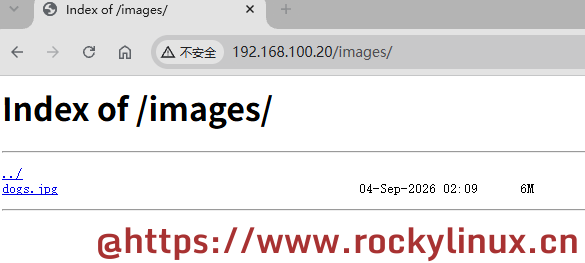
在前面演示目录别名功能时,/var/www/attachement/ 目录已经创建过且目录中存在一张图片:
Shell > ls -lh /var/www/attachment/
total 5.8M
-rw-r--r-- 1 root root 5.8M Sep  4 10:09 dogs.jpg
启动 Nginx:
Shell > /usr/local/nginx/sbin/nginx -t && /usr/local/nginx/sbin/nginx效果如下图所示:
提示
除 Nginx 原生的目录列表外,一些第三方模块可进一步美化目录列表,如 ngx-fancyindex,这里就不具体演示和说明了。
版权声明:「自由转载-保持署名-非商业性使用-禁止演绎 3.0 国际」(CC BY-NC-ND 3.0)

用一杯咖啡支持我们,我们的每一篇[文档]都经过实际操作和精心打磨,而不是简单地从网上复制粘贴。期间投入了大量心血,只为能够真正帮助到您。
暂无评论