
Claude Code 是 Anthropic 的代理式编程 CLI。它读取代码库、编辑文件、运行命令并管理 Git,你只需用自然语言描述目标。本文汇总实际常用命令、快捷键、配置、权限、MCP、后台代理和成本控制方法。
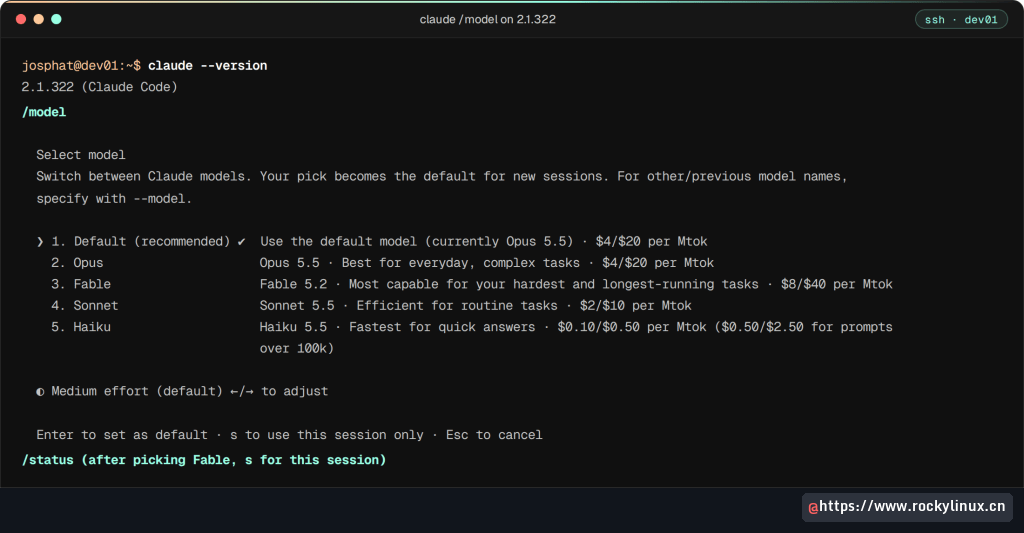
版本基线以 Claude Code 2.1.303 为主,2.1.304 的自动压缩窗口变更在 Ubuntu 26.04 上核验;fable 别名、/model 和快速模式又在 2.1.322 上复核。
每日必备 20 项
| 操作 | 方法 |
|---|---|
| 新会话 | claude |
| 继续上次会话 | claude -c |
| 初始化项目 | /init |
| 切换到计划模式 | Shift+Tab |
| 切换模型 | /model opus,或 Option+P / Alt+P |
| 撤销修改 | Esc + Esc |
| 释放上下文 | /compact |
| 全新开始 | /clear |
| 查看计划用量和成本 | /usage,/cost 为别名 |
| 查看修改 | /diff |
| 安全扫描 | /security-review |
| 为会话命名 | /rename my-feature |
| 恢复会话 | /resume 或 claude -r |
| 引用文件 | @path/to/file |
| 直接运行 Bash | !ls -la |
| 多行输入 | \ + Enter |
| 中途停止 | Esc |
| 退出 | Ctrl+D |
| 非交互执行 | claude -p "query" |
| 查看全部命令 | /help |
出错时按什么
| 场景 | 操作 |
|---|---|
| Claude 正在改错内容 | Esc 停止当前轮,已完成的修改保留 |
| 同时撤销代码和对话 | 空提示词处按 Esc Esc,或 /rewind 选择检查点 |
| 误清空长提示词 | 空提示词处按 Up 找回草稿 |
| 暂存写到一半的提示词 | Ctrl+S;空提示词处再次按下恢复 |
| 提旁支问题且不污染上下文 | /btw what does this regex match? |
| 上下文中途将满 | /compact keep the auth refactor notes,先 /context 查看占用 |
| 保留当前方向再尝试另一条路线 | /branch |
| 切换到无关任务 | /clear |
| 立即发送排队消息 | Ctrl+Enter,或 Ctrl+X Ctrl+S |
| 停止失控的后台子代理 | 3 秒内按两次 Ctrl+X Ctrl+K |
| 遇到用量限制 | /rate-limit-options |
| 配置故障 | /doctor,按 f 自动修复;claude --safe-mode 禁用全部定制 |
| CLAUDE.md 规则似乎不生效 | /doctor prompt-audit |
| 找回命名会话 | claude -r auth-fix |
Esc 和 Ctrl+C 最容易混淆:Esc 中断 Claude 但保留会话,空提示词处第二次按 Ctrl+C 才会退出整个 CLI。
2.1.282 到 2.1.304 的关键变化
- 未配置模式时,所有计划和提供方默认从 auto 开始;需要逐命令审批时,在项目设置中设置
permissions.defaultMode。 claude -p与 Agent SDK 在未指定模式时以 manual/default 运行,需要审批的工具调用在脚本中会被拒绝,除非传入--allowedTools或--permission-mode。/doctor prompt-audit检查 CLAUDE.md、技能、代理和命令中面向旧模型的提示词模式。/effort ultracode on|off成为独立开关,不再强制xhigh。/mcp reconnect all可重连全部 MCP 服务器。- 无人值守运行中的后台命令默认 30 分钟超时。
CLAUDE_CODE_AUTO_COMPACT_WINDOW支持k和M后缀。2.1.304 之前200k会静默变成 100K;现在越界会告警并夹紧。claude attach和claude logs可以只接受会话名的一部分。- 超过 200K token 的终端会话在空闲约 54 分钟后自动压缩。
自动压缩窗口示例:
CLAUDE_CODE_AUTO_COMPACT_WINDOW=50k claude -p "say hi"输出会说明读取值与实际采用值,例如:
CLAUDE_CODE_AUTO_COMPACT_WINDOW="50k" reads as 50,000 tokens, so Claude Code treats it as the 100k minimum.
Not logged in · Please run /login
安装
macOS、Linux 或 WSL:
curl -fsSL https://claude.ai/install.sh | bash
claude --version
macOS Homebrew:
brew install --cask claude-codeWindows PowerShell:
irm https://claude.ai/install.ps1 | iex正常版本输出类似 2.1.304 (Claude Code)。每台机器登录一次后,后续会话会复用认证。
快捷键
基本操作
| 快捷键 | 操作 |
|---|---|
Ctrl+C |
中断;无任务时第一次清空输入,第二次退出 |
Ctrl+S |
暂存当前提示词,再次按下恢复 |
Ctrl+Enter |
立即发送排队消息 |
Ctrl+_ |
撤销输入框最后一次编辑 |
Esc |
中途中断,保留已完成工作 |
Esc + Esc |
清空草稿;空输入时打开回退菜单 |
Ctrl+D |
退出 |
Ctrl+L |
重绘屏幕 |
Ctrl+R |
反向搜索历史 |
Shift+Tab |
循环权限模式 |
Ctrl+G |
用外部编辑器打开输入 |
Ctrl+O |
切换 transcript 查看器 |
Ctrl+T |
切换任务列表 |
Ctrl+B |
将 Bash 或代理移到后台 |
Ctrl+X Ctrl+K |
杀死全部后台子代理 |
输入与编辑
| 快捷键 | 操作 |
|---|---|
\ + Enter |
换行 |
Ctrl+J |
换行 |
Option+Enter / Alt+Enter |
平台默认换行 |
Shift+Enter |
支持的终端中换行 |
Ctrl+A / Ctrl+E |
行首 / 行尾 |
Ctrl+K / Ctrl+U |
删除到行尾 / 行首 |
Ctrl+W |
按 Bash 风格删除到上一个空白 |
Ctrl+Y |
粘贴刚删除的文本 |
Alt+B / Alt+F |
按词移动 |
Cmd+V / Ctrl+V / Alt+V |
粘贴剪贴板图片 |
Up/Down |
移动光标;到边界后浏览历史 |
模型和模式
| 快捷键 | 操作 |
|---|---|
Option+P / Alt+P |
打开模型选择器 |
Option+T / Alt+T |
切换扩展思考 |
Option+O / Alt+O |
切换快速模式 |
Shift+Tab / Alt+M |
循环权限模式 |
? |
显示全部快捷键 |
前缀:/ 打开斜杠命令,! 直接运行 Bash,@ 补全文件路径。
斜杠命令
| 命令 | 作用 |
|---|---|
/clear |
清空对话和上下文 |
/compact [focus] |
压缩会话,可指定保留重点 |
/cost / /usage |
查看计划限制、成本和缓存命中 |
/context |
可视化上下文占用 |
/resume |
选择并恢复会话 |
/rename |
命名当前会话 |
/rewind |
回退到检查点 |
/diff |
查看未提交修改 |
/copy |
复制最后回复 |
/export [file] |
导出对话 |
/cd [path] |
切换工作目录并保留提示词缓存 |
/background / /bg |
将会话转为后台代理 |
/tasks |
管理后台任务 |
/autocompact [size] |
设置自动压缩阈值 |
/model [name] |
切换模型并保存默认值 |
/effort [level] |
设置推理强度 |
/config [key=value] |
打开或修改设置 |
/permissions |
查看和管理工具权限 |
/mcp |
管理 MCP 与 OAuth |
/terminal-setup |
配置终端快捷键 |
/keybindings |
修改快捷键 |
/theme |
更改主题 |
/tui [fullscreen] |
切换终端渲染器 |
/output-style [name] |
设置输出风格 |
/skills |
列出技能及 token 成本 |
/plugin |
管理插件 |
/init |
生成 CLAUDE.md |
/memory |
编辑 CLAUDE.md 和自动记忆 |
/code-review [level] |
审查 diff,--fix 自动修复 |
/simplify [target] |
做复用、简化和效率清理 |
/review [PR] |
本地审查 PR |
/security-review |
扫描待提交改动的安全问题 |
/run / /verify |
启动并观察应用行为 |
/advisor [model] |
关键时刻咨询第二个模型 |
/import [codex\|gemini\|cursor] |
导入其他代理的配置 |
/add-dir [path] |
添加上下文目录 |
/plan |
进入只读计划模式 |
/branch [name] |
从当前对话分叉 |
/fork [directive] |
把对话复制到独立后台会话 |
/subtask [directive] |
创建继承完整对话的会话内子代理 |
/goal [condition] |
跨多轮持续工作直到条件满足 |
/batch [task] |
将大改动拆成 5 到 30 个并行工作树 |
/help |
查看全部命令 |
/doctor / /checkup |
检查安装、设置、认证和 MCP,并按 f 修复 |
/insights |
生成会话效率分析 |
/status |
查看版本、模型和账号 |
/login / /logout |
登录 / 退出 |
/stats |
查看使用统计 |
/release-notes |
查看更新日志 |
/loop [interval] [prompt] |
在会话内循环运行提示词 |
/voice |
按住空格进行语音输入 |
/schedule |
管理远程定时代理 |
/fast |
切换快速模式 |
/hooks |
管理 hooks |
/desktop |
将会话交给桌面应用 |
/teleport |
把网页或 iOS 会话拉回终端 |
/remote-control |
从 claude.ai 或 Claude 应用继续本地会话 |
/reload-skills |
重新扫描技能 |
/sandbox |
切换沙箱 |
/recap |
总结当前会话 |
/statusline |
配置状态栏 |
/debug [description] |
排查当前会话 |
/ultrareview |
云沙箱多代理代码审查 |
CLI 参数与自动化
启动会话和任务控制的常用命令:
claude
claude "refactor the auth module"
claude -c
claude -r "auth-refactor"
claude -n "feature-payments"
claude -w feature-branch
claude -w feature-branch --tmux
claude --from-pr 42
claude -c --fork-session
claude --permission-mode auto
claude --dangerously-skip-permissions
claude --permission-mode plan --allow-dangerously-skip-permissions
claude --bare
claude --safe-mode
claude --restricted
claude --remote-control
claude import codex --dry-run
--dangerously-skip-permissions 只应在一次性容器或沙箱中使用。--safe-mode 禁用全部定制以排查配置,--restricted 禁用 Bash、代码执行工具和 WebFetch,并把文件工具限制在工作目录。
管道与非交互模式
claude -p "explain this error in server.log"
cat error.log | claude -p "what caused this crash?"
git diff main | claude -p "review for security issues"
claude -p "list all TODO comments" --output-format json
claude -p "extract function names from auth.py" \
  --output-format json \
  --json-schema '{"type":"object","properties":{"functions":{"type":"array","items":{"type":"string"}}}}'
claude -p "run tests and fix failures" --allowedTools "Bash,Read,Edit"
claude -p "refactor the API layer" --max-budget-usd 5.00
claude -p "fix the bug" --max-turns 3
claude -p "review this code" --fallback-model haiku
claude -p "analyze this" --tools "Read,Grep,Glob"
claude -p "refactor auth module" --disallowedTools "Bash(rm:*),Bash(sudo:*)"
claude -p "review this code" --system-prompt "You are a security auditor. Focus only on vulnerabilities."
claude -p "explain this function" --append-system-prompt "Always include time complexity analysis."
claude -p "check open issues" --mcp-config ./ci-mcp.json
claude -p "run lint check" --no-session-persistence
claude -p "fix the build" --debug
claude -p "fix the build" --debug "api,hooks"
claude -p "fix the build" --debug-file /tmp/claude-debug.log
claude -p "review auth.py" --agent code-reviewer
claude -p "fix the build" --output-format stream-json --verbose
claude -p --input-format stream-json --output-format stream-json
claude -p "run lint" --session-id 550e8400-e29b-41d4-a716-446655440000
claude -p "audit deps" --settings ./ci-settings.json
claude -p "check types" --setting-sources user,project
claude -p "review" --system-prompt-file ./reviewer.txt
claude -p "lint" --exclude-dynamic-system-prompt-sections
claude --chrome
每次 -p 运行都会先计费系统提示词、工具定义和 CLAUDE.md,因此短脚本调用中模型别名往往比提示词长度更影响成本。
单次调用成本
claude -p --model haiku --output-format json "Reply with the single word ok" \
  | jq '{result, total_cost_usd, duration_ms, num_turns, modelUsage: (.modelUsage | keys)}'
示例:
{
  "result": "ok",
  "total_cost_usd": 0.00342609,
  "duration_ms": 1173,
  "num_turns": 1,
  "modelUsage": ["claude-haiku-5-5"]
}| 别名 | 解析模型 | 单词回复成本 |
|---|---|---|
haiku |
claude-haiku-5-5 |
$0.0034–$0.0039 |
sonnet |
claude-sonnet-5-5 |
$0.074 |
opus |
claude-opus-5-5 |
$0.143 |
fable(2.1.303) |
claude-fable-5-1 |
$0.404 |
2.1.321 起 fable 解析为 Fable 5.2,标准价格为 $8/$40 每百万 token,成本会低于旧数据。定时任务应明确使用 --model haiku 并设置 --max-budget-usd。
--bare 登录问题
--bare 会跳过 hooks、插件和 CLAUDE.md 自动发现,使 CI 可复现,但也不会读取 OAuth token 和钥匙串:
claude -p --bare --model haiku "Reply ok"结果可能是:
Not logged in · Please run /login此时 /login 无用。Anthropic API 场景必须提供 ANTHROPIC_API_KEY,或通过 --settings 提供 apiKeyHelper;否则去掉 --bare,改用 --setting-sources 控制配置来源。
子命令拼写错误会变成提示词
未知首词会被当作提示词。例如 claude stauts | head 会把 stauts 发给模型并产生计费,而不是报错。脚本应先验证子命令或显式使用 -p。
模型和推理参数
claude --model opus
claude --model sonnet
claude --model haiku
claude --model fable
claude --model claude-opus-5-5
claude --effort high
claude --effort low
claude --effort ultracode
claude --append-system-prompt "Always use TypeScript. Never use any."
claude --append-system-prompt-file ./coding-rules.txt
--append-system-prompt 只追加到默认系统提示词;--system-prompt 或 --system-prompt-file 会完全替换。
CLAUDE.md 项目指令
CLAUDE.md 在每个会话开始时自动加载,是定制项目行为最重要的文件。
| 位置 | 范围 | 团队共享 |
|---|---|---|
./CLAUDE.md |
当前项目 | 是 |
./.claude/CLAUDE.md |
当前项目 | 是 |
~/.claude/CLAUDE.md |
所有项目 | 否 |
.claude/rules/*.md |
路径规则 | 是 |
./AGENTS.md |
无 CLAUDE.md 时读取 | 是 |
如果同时存在 AGENTS.md 和 CLAUDE.md,只加载 CLAUDE.md。应在 CLAUDE.md 中用 @AGENTS.md 导入,或在 /config 中启用两者。
示例:
vi CLAUDE.md# My Project
## Build and Test
- Run tests: `npm test`
- Build: `npm run build`
- Lint: `npm run lint`
## Code Style
- Use TypeScript strict mode
- Prefer functional components in React
- All API responses must include error handling
- Never commit .env files
## Architecture
- Backend: Express.js + PostgreSQL
- Frontend: React + TailwindCSS
- Auth: JWT tokens stored in httpOnly cookies
See @README.md for project overview.
See @package.json for available scripts.路径规则示例:
mkdir -p .claude/rules
vi .claude/rules/api.md
---
paths:
- "src/api/**/*.ts"
---
# API Rules
- All endpoints must validate input with Zod
- Return proper HTTP status codes
- Include rate limiting on public endpoints/init 可自动生成 CLAUDE.md。
权限模式
| 模式 | 行为 | 场景 |
|---|---|---|
manual / default |
每种工具首次使用时询问 | 普通交互 |
plan |
只读,无编辑和命令 | 安全探索与规划 |
acceptEdits |
自动批准文件编辑,命令仍询问 | 可信编辑 |
dontAsk |
未预批准即拒绝 | 严格控制 |
auto |
AI 分类器逐次决定 | 有清晰 CLAUDE.md 的可信项目 |
bypassPermissions |
跳过全部提示 | 仅容器或沙箱 |
克隆仓库不能自行启用自动或绕过模式;项目设置中的 "defaultMode": "auto" 和 "bypassPermissions" 会被忽略。应在用户设置或启动参数中指定。
预批准工具:
claude --allowedTools "Read,Bash(git *)"
claude --disallowedTools "Bash(rm:*),Bash(sudo:*),Bash(chmod:*)"
claude --allowedTools "Bash(git:*),Read,Edit" \
  --disallowedTools "Bash(rm -rf:*)"
.claude/settings.json 示例:
{
  "permissions": {
    "allow": [
      "Read",
      "Bash(git *)",
      "Bash(npm run *)",
      "Bash(docker compose *)"
    ],
    "deny": ["Bash(rm -rf *)"]
  }
}
Deny 在 Allow 之前检查,匹配两者时拒绝。
模型与推理强度
| 别名 | 模型 | 适合 |
|---|---|---|
opus |
Opus 5.5 | 默认付费模型,复杂任务;1M 上下文 |
sonnet |
Sonnet 5.5 | 日常编辑、重构、测试;1M 上下文 |
haiku |
Haiku 5.5 | 简单任务、快速问题、低成本后台任务 |
fable |
Fable 5.2 | 最难、最长任务;标准价 $8/$40 每百万 token |
opusplan |
Opus → Sonnet | 计划用 Opus,执行自动切换 Sonnet |
default / best |
账户默认 / Opus | best 不再代表 Fable |
/model opus 或 Option+P / Alt+P 切换;选择器中的 s 仅对当前会话生效。需要固定版本时使用 claude-opus-5-5 等完整 ID。
| 推理级别 | 适合 |
|---|---|
low |
范围小、延迟敏感、不依赖高智能的任务 |
medium |
日常重构、单文件修改、测试生成 |
high |
多文件编辑、调试和复杂工作 |
xhigh |
架构决策、跨模块重构、棘手缺陷 |
max |
极难问题,最深推理,容易过度思考,仅当前会话 |
ultracode on\|off |
启用后台代理动态工作流,不再强制 xhigh |
单次深度思考可以在提示词任意位置写 ultrathink。旧式 think、think hard、think harder 已不再是特殊关键词。
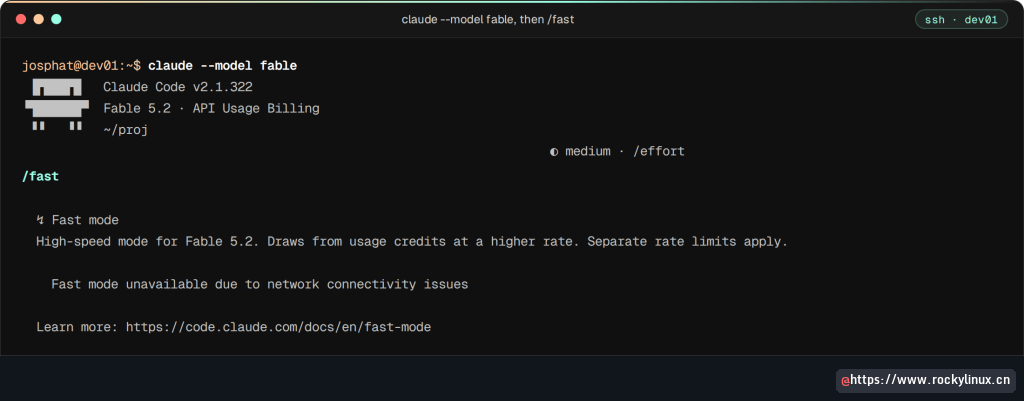
Fable 5.2 快速模式
claude --model fable在会话中运行 /fast,按 Space 切换、Enter 确认,或直接按 Option+O / Alt+O。提示词旁的 ↯ 表示开启。快速模式最多快 2.5 倍,价格 $16/$80 每百万 token。设置中的 "fastMode": true 只有在 Fable 5.2 为当前模型并执行 /fast 后才对 Fable 生效。
MCP 服务器
项目配置位于 .mcp.json;个人全局服务位于 ~/.claude.json。
vi .mcp.json{
"mcpServers": {
"github": {
"type": "stdio",
"command": "npx",
"args": ["@modelcontextprotocol/server-github"],
"env": {
"GITHUB_PERSONAL_ACCESS_TOKEN": "$GITHUB_TOKEN"
}
},
"postgres": {
"type": "stdio",
"command": "npx",
"args": ["@modelcontextprotocol/server-postgres"],
"env": {
"DATABASE_URL": "postgresql://user:pass@localhost:5432/mydb"
}
}
}
}命令行管理:
claude mcp add --transport http sentry https://mcp.sentry.dev/mcp
claude mcp add --transport http --scope user sentry https://mcp.sentry.dev/mcp
claude mcp add github -e GITHUB_PERSONAL_ACCESS_TOKEN=$GITHUB_TOKEN -- npx @modelcontextprotocol/server-github
claude mcp list
claude mcp get github
claude mcp remove github
claude mcp login github
claude mcp logout github
CI 中可以固定配置来源:
claude --mcp-config ./team-mcp.json
claude --mcp-config ./github-mcp.json ./db-mcp.json
claude --mcp-config ./ci-mcp.json --strict-mcp-config
--strict-mcp-config 会忽略 .mcp.json 和用户设置中的其他服务器。
自定义技能
技能是可复用的提示词,以斜杠命令呈现:
mkdir -p .claude/skills/deploy
vi .claude/skills/deploy/SKILL.md
---
name: deploy
description: Deploy the application to production
argument-hint: "[environment]"
user-invocable: true
---
Deploy the application to the $0 environment (default: staging).
Steps:
1. Run the test suite
2. Build the production bundle
3. Deploy using the deploy script
4. Verify the deployment health check使用:/deploy production。
自定义子代理
子代理保存在 .claude/agents/(项目)或 ~/.claude/agents/(个人):
mkdir -p .claude/agents
vi .claude/agents/code-reviewer.md
---
name: code-reviewer
description: Expert code reviewer. Use proactively after code changes.
tools: Read, Grep, Glob, Bash
model: sonnet
---
You are a senior code reviewer. When reviewing code:
- Check for security vulnerabilities (SQL injection, XSS, etc.)
- Verify error handling is complete
- Flag any hardcoded secrets or credentials
- Suggest performance improvements
- Check for proper input validation可用 @code-reviewer check my latest changes 调用。窄任务可在 frontmatter 中设置 omitClaudeMd: true,避免加载用户和项目指令。
CLI 指定代理:
claude --agent code-reviewer
claude -p "review the latest commit" --agent code-reviewer
claude --agents '{"qa": {"description": "QA tester", "prompt": "You are a QA engineer. Write test cases for every change."}}'
Hooks 自动触发器
Hooks 在 Claude Code 事件发生时自动执行 shell 命令:
{
  "hooks": {
    "PostToolUse": [
      {
        "matcher": "Edit|Write",
        "hooks": [
          {
            "type": "command",
            "command": "npx prettier --write $(jq -r '.tool_input.file_path')"
          }
        ]
      }
    ],
    "Notification": [
      {
        "matcher": "",
        "hooks": [
          {
            "type": "command",
            "command": "osascript -e 'display notification \"Claude needs input\" with title \"Claude Code\"'"
          }
        ]
      }
    ]
  }
}常用事件:SessionStart、UserPromptSubmit、PreToolUse、PermissionRequest、PostToolUse、Stop、SubagentStop、PreCompact、Notification、SessionEnd。较新事件还有 PostToolUseFailure、FileChanged、CwdChanged、DirectoryAdded、WorktreeCreate 和 PreModelSwitch。
上下文管理
| 命令 | 时机 |
|---|---|
/compact |
任务中途压缩会话 |
/compact Focus on auth module |
保留特定上下文并压缩其余内容 |
/clear |
无关任务之间完全重置 |
/context |
查看上下文占用 |
长会话建议:无关任务之间 /clear;看到变慢时主动 /compact;测试和日志分析交给子代理;重复指令写进技能;CLAUDE.md 控制在 200 行以内,细节用 @filename 导入。
Git 工作树与后台代理
claude -w feature-auth
/batch migrate all components from class-based to functional
-w 创建隔离的 Git worktree,完成后合回分支。
后台代理是脱离终端的完整 Claude Code 会话:
claude --bg "investigate the flaky test in tests/auth"
claude --bg --exec 'pytest -x'
claude --bg --agent code-reviewer "review the open PR"
claude --bg "fix the failing CI checks, then commit and open a PR"
交互会话中可用 /background 或 /bg 分离,/tasks 查看。/fork 把当前对话复制到新后台会话,/subtask 则在会话内创建子代理。代理管理界面:
claude agents动态工作流会把一个任务拆成多个并行后台子代理。设置 ultracode 后,用 /workflows 查看进度;默认中等规模少于 10 个代理,Pro 计划默认少于 5 个。/batch 会把大范围改动拆成独立工作树,每个工作树可单独创建 PR。
设置与目录
| 文件 | 范围 |
|---|---|
.claude/settings.json |
项目共享 |
.claude/settings.local.json |
项目个人,Git 忽略 |
~/.claude/settings.json |
全部项目个人设置 |
{
  "model": "opus",
  "modelSettings": {
    "claude-opus-5-5": { "effortLevel": "high" }
  },
  "autoMemoryEnabled": true,
  "permissions": {
    "defaultMode": "manual",
    "allow": ["Read", "Bash(git *)"],
    "deny": ["Bash(rm -rf *)"]
  }
}
settings.local.json 可能保存包含敏感 token 的“不要再问”命令。复制或共享前应检查并删除无法解释的 allow 条目。
目录结构:
~/.claude.json           # 用户级 MCP 和应用状态
~/.claude/
  settings.json          # 全局设置
  keybindings.json       # 快捷键
  CLAUDE.md              # 个人指令
  rules/
  agents/
  skills/

.claude/
  settings.json          # 项目设置
  settings.local.json    # 本地覆盖,Git 忽略
  CLAUDE.md              # 项目指令
  rules/
  agents/
  skills/
.mcp.json                # 项目 MCP
CLAUDE.md                # 项目指令备用位置
AGENTS.md                # 无 CLAUDE.md 时读取
环境变量
| 变量 | 作用 |
|---|---|
ANTHROPIC_MODEL |
强制当前会话模型 |
ANTHROPIC_DEFAULT_MODEL |
新会话默认模型 |
ANTHROPIC_API_KEY |
直接 API 密钥 |
CLAUDE_CODE_EFFORT_LEVEL |
默认推理强度 |
CLAUDE_CODE_DISABLE_AUTO_MEMORY=1 |
禁用自动记忆 |
CLAUDE_CODE_DISABLE_1M_CONTEXT=1 |
禁用 1M 上下文 |
MAX_THINKING_TOKENS |
自定义思考预算 |
HTTPS_PROXY |
企业 HTTP 代理 |
CLAUDE_CODE_NO_FLICKER=1 |
启用无闪烁全屏 TUI |
ENABLE_TOOL_SEARCH |
控制 MCP 工具按需发现 |
CLAUDE_CODE_SUBAGENT_MODEL |
子代理默认模型 |
CLAUDE_CODE_MAX_WEB_SEARCHES_PER_SESSION |
每会话 WebSearch 上限,默认 200 |
CLAUDE_CODE_MCP_AUTO_BACKGROUND_MS |
MCP 调用转后台的等待时间,默认 2 分钟 |
CLAUDE_CODE_DISABLE_AGENT_VIEW=1 |
关闭后台代理 |
CLAUDE_CODE_DISABLE_WORKFLOWS=1 |
关闭动态工作流 |
CLAUDE_CODE_DISABLE_BACKGROUND_TASKS=1 |
关闭后台 Bash |
DISABLE_AUTOUPDATER=1 |
禁用自动更新 |
ANTHROPIC_DEFAULT_FABLE_MODEL |
固定 fable 别名 |
CLAUDE_CODE_AUTO_COMPACT_WINDOW |
自动压缩阈值,支持 200k、1M |
CLAUDE_CODE_RETRY_WATCHDOG=1 |
无人值守时持续重试 429/529 |
CLAUDE_CODE_RESTRICTED=1 |
受限模式 |
CLAUDE_CODE_SAFE_MODE=1 |
安全模式 |
CLAUDE_CODE_AUTO_MODE_SERVER=0 |
自动模式分类器保持在本地 |
CLAUDE_CODE_AUTO_MODE_MODEL |
自动模式分类器模型 |
CLAUDE_CODE_IDLE_COMPACT_MIN_TOKENS |
空闲压缩的最小上下文,默认 200000 |
CLAUDE_CODE_DISABLE_WEB_FETCH=1 |
禁用 WebFetch,保留 WebSearch |
CLAUDE_CODE_DISABLE_FILE_MENTIONS=1 |
@ 只传路径,不展开文件内容 |
ANTHROPIC_BASE_URL 指定 LLM 网关,ANTHROPIC_AUTH_TOKEN 以 Bearer 头传递网关凭据。二者配合 ANTHROPIC_MODEL 可接入自托管代理,但 Anthropic 不支持通过网关运行非 Claude 模型;官方支持范围仍限于 Anthropic、Bedrock、Vertex 和 Foundry。
无闪烁渲染:
echo 'export CLAUDE_CODE_NO_FLICKER=1' >> ~/.zshrc
source ~/.zshrc
alias c="CLAUDE_CODE_NO_FLICKER=1 claude --effort max"实用工作流
初始化:
cd /path/to/project
claude
/init
审阅并修改生成的 CLAUDE.md,它会塑造之后每次交互。
计划优先:按 Shift+Tab 进入 plan 模式,探索后批准计划,再返回默认模式并说“实现计划”。
撤销:Esc + Esc 打开 rewind,选择同时恢复代码和对话。
将一切管道化:
tail -500 /var/log/app.log | claude -p "find the root cause of errors"
gh pr diff 42 | claude -p "security review this PR"
git diff --staged | claude -p "write a conventional commit message" --model haiku
cat README.md | claude -p "translate to Japanese" > README.ja.md
docker ps --format json | claude -p "which containers are using the most resources?"
kubectl logs deployment/api --tail=200 | claude -p "why are requests failing?"
pg_dump --schema-only mydb | claude -p "suggest index improvements"
git log --oneline -20 | claude -p "write release notes from these commits"
cat /etc/nginx/nginx.conf | claude -p "check for misconfigurations"
自动 PR 审查脚本:
#!/bin/bash
git diff HEAD~1 > /tmp/diff.txt
cat /tmp/diff.txt | claude -p "review for security issues" --model sonnet > security_review.md
cat /tmp/diff.txt | claude -p "check for performance regressions" --model sonnet > perf_review.md
cat /tmp/diff.txt | claude -p "write a one-paragraph summary" --model haiku > summary.md
批量生成 docstring:
#!/bin/bash
for f in $(grep -rL '"""' src/*.py); do
  claude -p "add docstrings to functions missing them in $f" \
    --allowedTools "Read,Edit" --max-turns 3
done
旁支问题:
/btw what was the name of that config file we edited earlier?回答不会写入上下文,使用缓存且不调用工具。
提示词技巧
| 差提示词 | 好提示词 |
|---|---|
| “修复 bug” | “邮箱含加号时登录接口返回 500;修复 src/auth/login.ts 的输入校验” |
| “让它更快” | “/api/users 在 1 万行时耗时 3 秒;增加数据库索引和分页” |
| “写测试” | “为 src/pricing.ts 的 calculateDiscount 写单元测试,覆盖零价格、负数量和过期优惠券” |
| “清理代码” | “把 src/api/orders.ts 和 src/api/returns.ts 的重复校验抽成共享 validator” |
复杂任务先计划:
I need to add OAuth2 login with Google. Look at the existing auth flow
in src/auth/ and propose where to add the Google provider without
breaking the current email/password login.
提供验证目标:
Add rate limiting to the /api/auth endpoints. After implementing,
run npm test to make sure nothing breaks, and verify the rate limiter
works by checking the middleware is registered in the Express app.
使用文件引用:
look at @src/db/schema.ts and @src/api/users.ts - the User model
has a new 'role' field in the schema but the API doesn't expose it.
Add the role field to the GET /users/:id response.
发现方向错误应尽早按 Ctrl+C,不要等大改动完成。大任务拆成可验证的小步骤。
Token 节省策略
| 策略 | 方法 | 节省效果 |
|---|---|---|
| 任务间清空 | /clear |
效果最大,重置为零 |
| 主动压缩 | /compact Focus on the auth module changes |
保留相关上下文,丢弃噪声 |
| 查看占用 | /context |
找出膨胀来源 |
| 使用文件引用 | @src/auth.ts |
避免探索式搜索 |
| 使用子代理 | 测试、日志分析等交给子代理 | 输出留在子代理上下文 |
| 任务 | 模型 | 推理强度 |
|---|---|---|
| 简单编辑、重命名、格式化 | Sonnet | low |
| 常规编码、测试、重构 | Sonnet | medium |
| 复杂调试、架构 | Opus | high |
| 快速问题 | Haiku(/btw) |
不适用 |
CLAUDE.md 主文件保持在 200 行以内;长说明放入技能或 @file;路径规则放入 .claude/rules/。关闭不用的 MCP,优先使用 gh、aws、gcloud 等 CLI。CI 必须设置金额和时间上限:
claude -p "fix failing tests" --max-budget-usd 2.00
claude -p "review this file" --max-turns 3
claude -p "check for linting errors" --model haiku
--max-turns 到达上限会报错退出;--max-budget-usd 使用客户端估算,实际可能略超,需要留余量。
诊断
claude --debug
claude --debug "api,hooks"
claude --debug-file /tmp/claude-debug.log
/doctor 或 /checkup 会检查版本、自动更新、认证、连通性、设置冲突、MCP 健康、未使用技能和插件、CLAUDE.md 重复与拆分、慢 hooks 等,并可在确认后自动修复。
/insights 分析 token 使用、昂贵操作、工作习惯、等待时间与效率建议。
IDE 集成
VS Code / Cursor:安装“Claude Code”扩展,从命令面板搜索 Claude Code。
JetBrains:从 Marketplace 安装“Claude Code”,支持交互式 diff 和上下文共享。
自动检测 IDE:
claude --ide只有一个支持的 IDE 运行时自动连接;多个时在 /ide 中选择。
Auto 模式与循环任务
Auto 模式使用 AI 分类器判断每次工具调用是否安全,允许读取、git status、测试等,阻止强制推送、rm -rf 和生产部署:
claude --permission-mode auto
claude auto-mode config
claude auto-mode defaults
claude auto-mode critique
规则位于 .claude/settings.json 或 ~/.claude/settings.json 的 autoMode 键下,可配置 allow、soft_deny 和 environment。
循环任务:
/loop 5m check if the deploy on staging is complete
/loop /test
/loop 2m /security-review
每次迭代使用独立上下文,循环在后台运行,直到停止或会话结束。
子命令
| 子命令 | 作用 |
|---|---|
claude agents |
打开代理视图,管理并行后台会话 |
claude attach <id> |
将后台会话接到当前终端 |
claude logs <id> |
查看后台输出 |
claude stop <id> |
停止后台会话 |
claude respawn <id> |
保留对话重启后台会话 |
claude rm <id> |
从列表删除,transcript 留在磁盘 |
claude daemon status |
查看后台监督进程 |
claude auth |
登录、退出、状态 |
claude auto-mode |
查看、评估、重置自动模式规则 |
claude doctor |
检查更新器、认证、MCP 和设置 |
claude import |
从 Codex、Gemini、Cursor 导入配置 |
claude install |
安装指定版本 |
claude mcp |
管理 MCP |
claude plugin |
安装、列出、检查、验证插件 |
claude plugin eval |
运行插件测试集 |
claude purge [path] |
删除项目本地状态,--dry-run 预览 |
claude remote-control |
提供远程控制服务 |
claude ultrareview |
云端多代理代码审查 |
claude setup-token |
创建长期认证 token |
claude update |
检查并安装更新 |
Claude Code 只直接或经 Bedrock、Vertex、Foundry 连接 Anthropic 模型。需要本地模型或其他提供方时,可考虑 OpenCode、Aider、Claw Code 或 Hermes Agent;团队已有 GitHub Copilot 时,Copilot CLI 也能运行 Claude 或 GPT 模型。claude import codex、gemini 或 cursor 可迁移指令文件、MCP 和技能,--dry-run 可先预览。