
概述
本章,您将学习到 Apache httpd 的目录别名功能。
Web 服务器的目录别名
几乎所有的 Web 服务器都支持这个功能,简单理解为一种类似调取资源文件的快捷方式。
当 Apache httpd 接受客户端请求时,默认情况下会在 DocumenRoot 指令指定的目录下将相关资源发送给客户端。但是,有时客户端访问的资源并不在这个指令指定的目录下,我们希望被访问的资源在操作系统中被保留在原始的位置且不需要移动,这就需要目录别名。
启用目录别名功能的前提条件
- 需要使用
Alias指令,该指令由 mod_alias 模块提供,即 mod_alias 模块已被加载 Alias指令与Directroy配置段必须成对出现- 对于对应的资源目录而言,相关的用户(在我的环境中为
daemon这个用户)需要有 x 权限;而对于资源目录下的文件,则相关用户(在我的环境中为daemon这个用户)需要有 r 权限
配置示例
Shell > /usr/local/apache2/bin/apachectl -M
Loaded Modules:
 core_module (static)
 so_module (static)
 http_module (static)
 mpm_event_module (shared)
 authn_file_module (shared)
 authn_core_module (shared)
 authz_host_module (shared)
 authz_groupfile_module (shared)
 authz_user_module (shared)
 authz_core_module (shared)
 access_compat_module (shared)
 auth_basic_module (shared)
 reqtimeout_module (shared)
 filter_module (shared)
 mime_module (shared)
 log_config_module (shared)
 env_module (shared)
 headers_module (shared)
 setenvif_module (shared)
 version_module (shared)
 unixd_module (shared)
 status_module (shared)
 autoindex_module (shared)
 dir_module (shared)
 alias_module (shared)
括号里标注 static,表示该模块已静态编译进 Apache 内核,即所谓的静态编译模块;而标注为 shared,则表示该模块以 DSO 方式动态加载,即所谓的动态加载模块。如输出显示的那样,alias_module 是以 DSO 的方式动态加载。
Shell > grep  ^DocumentRoot /usr/local/apache2/conf/httpd.conf
DocumentRoot "/usr/local/apache2/htdocs"

Shell > grep alias_module /usr/local/apache2/conf/httpd.conf  | grep ^Load
LoadModule alias_module modules/mod_alias.so

Shell > cat /usr/local/apache2/conf/extra/httpd-autoindex.conf
...
Alias /icons/ "/usr/local/apache2/icons/"

<Directory "/usr/local/apache2/icons">
    Options Indexes MultiViews
    AllowOverride None
    Require all granted
</Directory>
...
Web 服务器的网页目录为 /usr/local/apache2/htdocs,而客户端若需要访问 /usr/local/apache2/icons/ 目录下的资源,就需要目录别名。
# 将 httpd-autoindex.conf 加载进来
Shell > grep httpd-autoindex /usr/local/apache2/conf/httpd.conf
Include conf/extra/httpd-autoindex.conf

# 启动 Web 服务器
Shell > /usr/local/apache2/bin/apachectl start
效果如下:
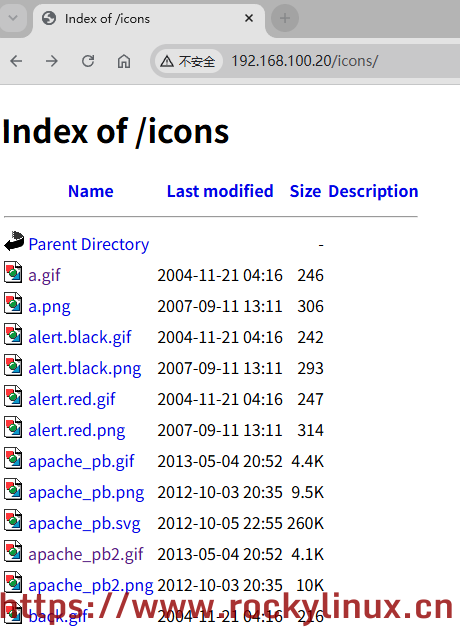
由于 Options 指令有 indexes 指令参数且 /usr/local/apache2/icons/ 目录下没有索引文件 index.html,所以会自动生成并显示文件列表。
有了上面的示例配置,可以再来一个实际的配置:
Shell > mkdir /project/ && cd /project/ && echo "Work!" > index.html

# 变更相关权限
Shell > chmod 775 /project/ && chgrp -R daemon /project/

Shell > vim /usr/local/apache2/conf/httpd.conf
...
Alias /p/ "/project/"

<Directory "/project">
        Options Indexes MultiViews
        AllowOverride None
        Require all granted
</Directory>

Shell > /usr/local/apache2/bin/apachectl restart
Shell > curl http://192.168.100.20:80/p/
Work!
还原
Shell > /usr/local/apache2/bin/apachectl stop

Shell > rm -rf /project/

Shell > vim /usr/local/apache2/conf/httpd.conf
...
#Include conf/extra/httpd-autoindex.conf
...
#Alias /p/ "/project/"
#
#<Directory "/project">
#        Options Indexes MultiViews
#        AllowOverride None
#        Require all granted
#</Directory>版权声明:「自由转载-保持署名-非商业性使用-禁止演绎 3.0 国际」(CC BY-NC-ND 3.0)

用一杯咖啡支持我们,我们的每一篇[文档]都经过实际操作和精心打磨,而不是简单地从网上复制粘贴。期间投入了大量心血,只为能够真正帮助到您。
暂无评论